Everything monday's email automations can't do
Build the template once. Every send fills itself in.
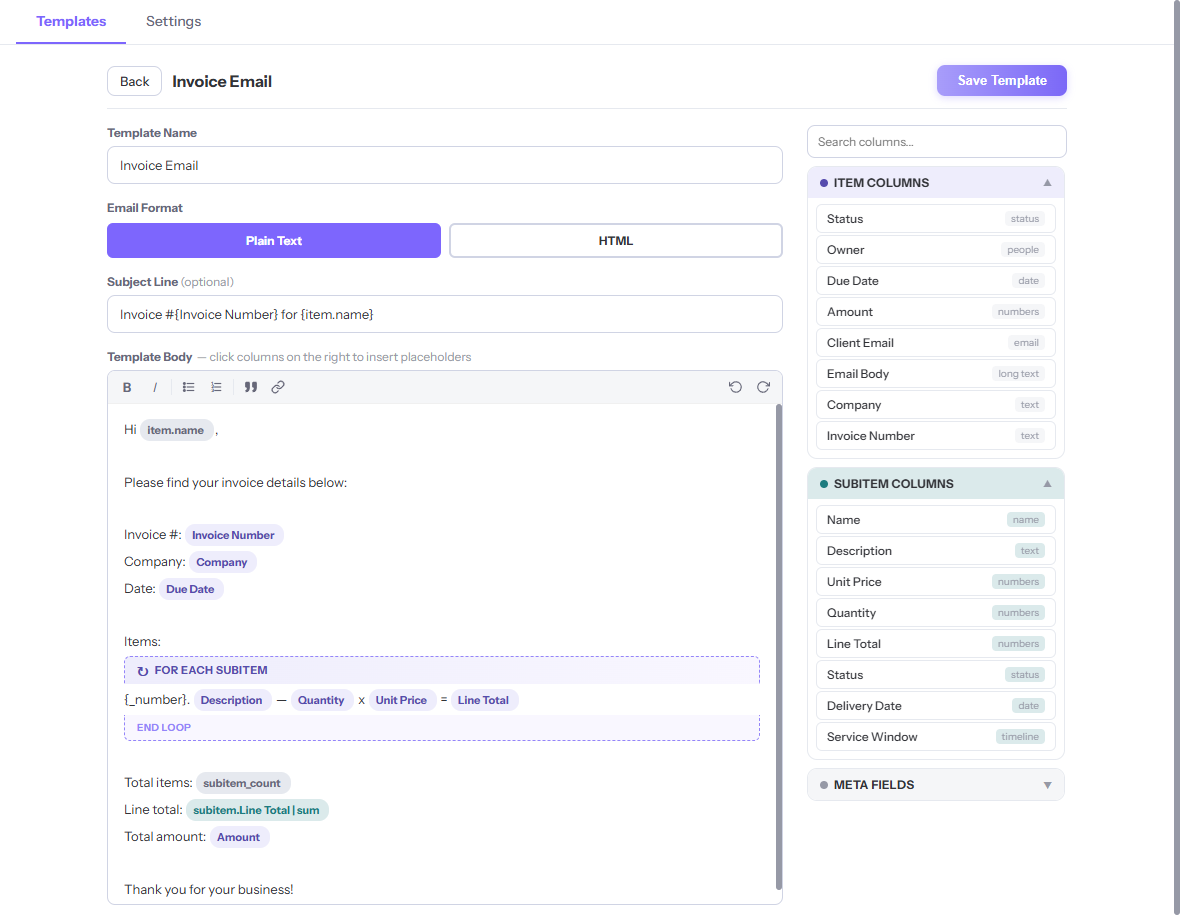
Subitem data in emails
Reference subitem columns right in the body — {subitem.Description} — or pull one row with {subitems[0].Description}. monday's native emails can't reach this data.
Click to insert, no syntax
Click any column in the picker and it lands in your template as a placeholder. Nothing to memorize, nothing to mistype.
Loops & filters
{#each subitem} repeats a block for every row — perfect for invoice lines. Add a filter like where Status = "Paid" to keep only the rows you want.
Totals & smart dates
Sum, average, count, min or max across subitems — {subitem.Line Total | sum}. Format any date column with 13 presets, from 31st March 2026 to 03/31/2026.
Plain text or rich HTML
Send simple text, or switch to HTML for bold, lists, links and on-brand formatting. Your choice per template.
Templates across boards
An account-wide workspace view lists every template on every board. Search them, edit them, copy one to another board.
From template to sent email in four steps
Set it up once. Every automation email fills itself in.
Add the view
On the board you send from: + Add view → Apps → Ripple Merge.
Build your template
Click + New, then click columns to insert placeholders. Choose Plain Text or HTML.
Add the action
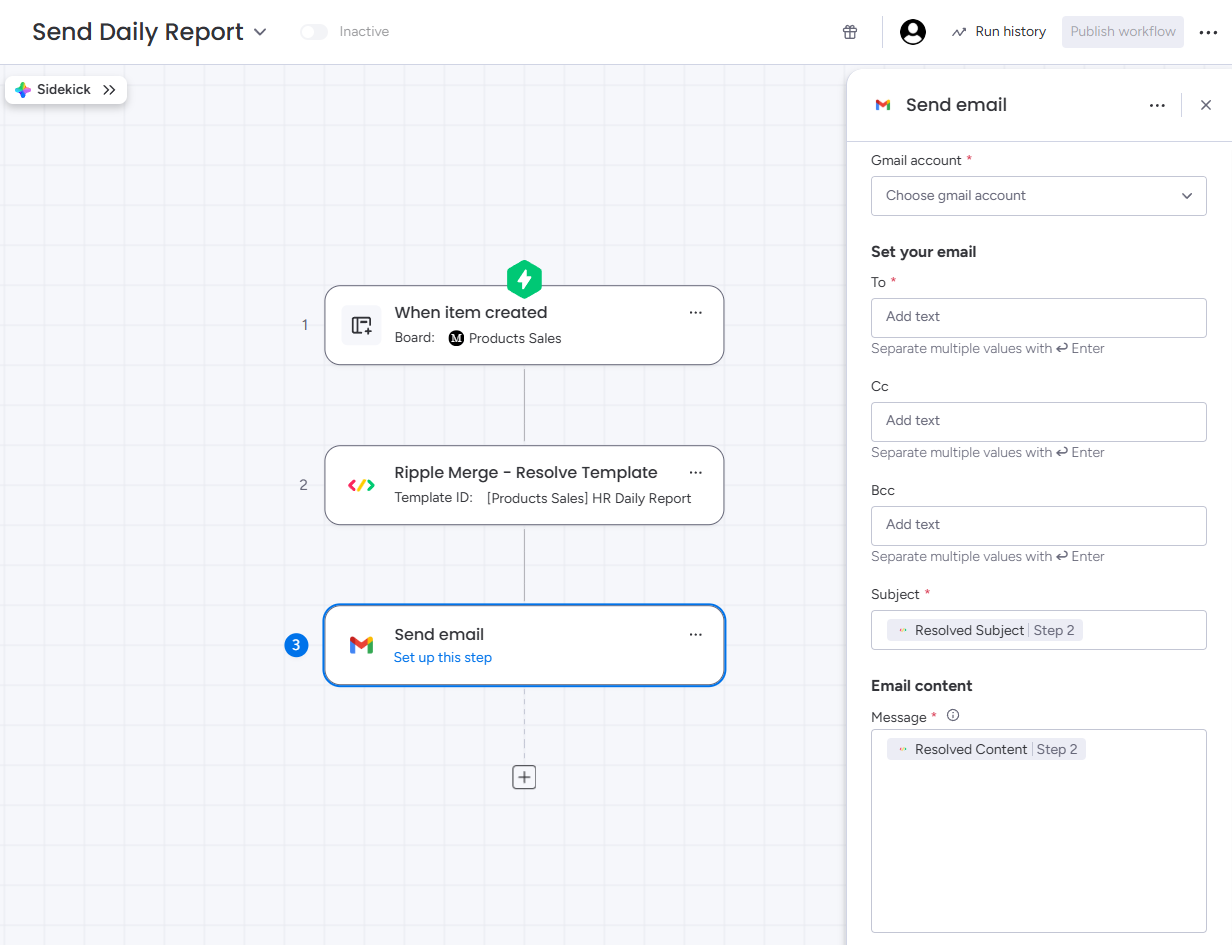
In the workflow builder, add "Ripple Merge — Resolve Template" after your trigger and pick your template.
Chain Send Email
Add monday's Send Email step. Map Subject to Resolved Subject and Message to Resolved Content.
Drops straight into your automations
No new email sender to trust. Ripple Merge resolves the template, then monday's own Send Email action does the sending.
- Works with the triggers you already use
- Returns Resolved Subject and Resolved Content for the next step
- Add as many Resolve + Send pairs as one workflow needs
Your data never leaves monday.com
Templates live in monday's Storage API. The backend runs on monday-code, monday's own hosting platform. There is nothing else.
- No third-party services, no analytics, no tracking
- Item and subitem values are processed in memory during a run, never stored
- Uninstall the app and its stored data is deleted automatically
Or just describe it — AI writes the template
Ripple Merge AI turns a sentence into a ready-to-send mail merge template — and keeps working at send time.
Write with AI
Describe the email — "order confirmation listing every line item with a total, friendly tone" — and get a complete template with placeholders wired to your actual board columns: subitem loops, totals and formatted dates included. Empty board? The AI suggests three templates to start from.
A fresh summary in every email
Drop {ai.summary} into a template and every email opens with a 2–3 sentence AI-written summary of the item and its line items — generated from the live board data the moment your automation fires.
Your client's language, automatically
Point a template at a Country or Language column and each email is AI-translated into the recipient's language at send time — "Spain" is enough. Translations are cached and placeholders stay intact.
Refine anything
More formal, friendlier, shorter, grammar-perfect, or translated into six languages — one click, and every placeholder survives the rewrite. AI subject-line suggestions included.
Self-healing templates
Renamed or deleted a column? Templates flag it — and "Fix columns with AI" remaps every broken placeholder onto your real columns in one click, with your review before saving.
Private by design
The editor AI sees only your column names and what you type — never board item values. The opt-in AI summary and language settings are the only send-time exceptions, processed transiently and fully disclosed in the privacy policy.
Simple, transparent pricing
Every plan has every feature. Only the send volume differs.
Free
- 20 resolved emails per month
- All features included
- Subitem data, loops & totals
- Plain text & HTML templates
Pro
- 500 resolved emails per month
- All features included
- Subitem data, loops & totals
- Plain text & HTML templates
Business
- Unlimited resolved emails
- All features included
- Subitem data, loops & totals
- Plain text & HTML templates
Stop copying subitems into emails by hand.
Install Ripple Merge and send your first merged email in minutes.
